- I've made the tool I use to analyze SPX options positioning free for everyone: upload a CSV downloaded from the CBOE website and get GEX, Gamma Flip, Put/Call Walls, Max Pain, Expected Move, flow drift and a 3D volatility surface in a matter of seconds.
- The core idea: whoever sells options in bulk (the market makers) has to hedge by buying and selling the underlying, and that activity leaves measurable footprints. The tool estimates them and turns them into a map of levels and regimes.
- No coding skills and no paid data required: all you need is 5 minutes and CBOE's free options chain file. In this guide I walk through a real case — the SPX chain from July 18, 2026 — from downloading the file to the very last tab.
- The tool always states its assumptions: dealer exposures are model estimates, not observed positions. In this article you'll find the limitations too, not just the strengths.
- Bonus: one button exports the entire analysis to an AI-ready JSON file — attach it to Claude or ChatGPT and have it build the day's positioning commentary for you.
Open the SPX Options Chain Analyzer
The dashboard is public and runs in your browser, even on a smartphone. My advice: open it now in another tab and use this guide as a step-by-step manual, section by section, while you try it for the first time.
What the tool does — and why options positioning moves the market
Every day, millions of SPX options change hands. On the other side of those contracts there are almost always the market makers (the "dealers"): professional firms that continuously quote bid and ask and that, by trade, don't bet on market direction. To stay neutral, they have to hedge by buying and selling the index as the price moves. When open contracts number in the millions, that hedging becomes a huge flow — large enough to dampen or amplify the market's own moves.
Here's the point: dealer hedging isn't random. It depends on where open interest (the open contracts) is concentrated and on how those contracts' Greeks respond to price and volatility. If you have a snapshot of the chain — strike by strike — you can estimate where those hedging flows will push or slow the market. That's exactly what professional desks do with paid data, and it's what the SPX Options Chain Analyzer does for free, starting from a simple public CSV file.
In practice, from a single file the tool computes six families of metrics:
| Analysis | Short name | What it tells you, in one line |
|---|---|---|
| Gamma Exposure | GEX | The market's "weather": are dealers dampening moves (long gamma) or amplifying them (short gamma)? And where is the turning point (Gamma Flip)? |
| Delta Exposure | DEX | The net directional positioning of open contracts: are calls dominant (bullish tone) or puts (defensive tone)? |
| Vanna Exposure | VEX | How sensitive positioning is to moves in implied volatility — the hidden engine behind many modern rallies and crashes. |
| Levels | Walls | Put Wall and Call Wall (the open-interest "walls" that act as support/resistance), Max Pain, Expected Move. |
| Activity | Drift | Where today's volume is concentrating: the center of gravity of the flows (VWAS), volume/open interest ratio, Put/Call ratio. |
| Volatility | IV 3D | The implied volatility surface in three dimensions: skew, term structure and stress zones. |
Although it was built for SPX, the tool works with any options chain exported from the CBOE website in the same format: other indexes, ETFs, single stocks. And here's something I care about: every section of the dashboard includes a "How to read this section" box, and at the top you'll find a complete beginner's glossary — options, Greeks, dealers, skew, pinning. It's designed to be used both by people who have been hedging for years and by those opening an options chain for the very first time.
Step 1 — Download the data: the free CSV from the CBOE website
The tool doesn't connect to any API and doesn't ask for credentials: the input is a CSV file that anyone can download for free from the website of CBOE, the exchange where SPX options are listed (data delayed by 15 minutes). The process takes about a minute:
Go to cboe.com and open the Quotes Dashboard
Open www.cboe.com and navigate the menu to Data → Quotes Dashboard. Alternatively, go straight to cboe.com/delayed_quotes/spx/quote_table.
Search for the ticker
In the search bar, type spx (or whatever symbol you're interested in) and press Search. A summary of the underlying appears at the top: Last, Bid, Ask and change, with the data timestamp.
Open the "Options" tab and set the filters
Below the title, select the Options sub-tab. Then set: Volume All · Expiration Type All (includes both the monthly SPX and the weekly SPXW expirations) · Options Range All · Expiration: the month you're interested in, or All. The filter that matters most is Options Range: All — you need the entire strike chain, not just the strikes near the price.
Click "View Chain" and download the CSV
The page shows the full chain: Calls on the left, Puts on the right, Strike in the middle (in our example: 3,611 records). Scroll all the way down, below the expiration buttons, and click Download CSV. You'll get a file like spx_quotedata.csv (~500 KB).
Upload the file to the tool
Open the dashboard, drag the CSV into the "Carica il file CSV della CBOE Options Chain" uploader (Upload the CBOE Options Chain CSV file) and wait a few seconds: the full analysis appears on its own.
1) Always use Options Range: All. With "Near the Money," the wings of the chain would be missing and metrics such as total GEX, Max Pain and the Put/Call ratio would be distorted.
2) Download and analyze in the same session (or with markets closed): open interest and Greeks capture the moment of the export.
3) Don't edit the CSV. The tool expects the original CBOE format, with the header rows intact.
4) Remember that data on CBOE's public dashboard is delayed by 15 minutes — more than enough for a positioning analysis, which works on the stock of accumulated contracts, not on individual ticks.
Step 2 — Upload the file and choose the expiration
On upload, the tool reads the file header and automatically extracts the Spot Price (the index price at the time of the export) and the data timestamp, which it uses to compute the days remaining to each expiration. It then separates calls and puts, cleans the data and discards whatever can't be analyzed, keeping only contracts with open interest greater than zero — the positioning that actually exists. If something doesn't add up (missing Greeks, spot price that can't be determined), it doesn't guess: it flags it with an explicit warning.
In the example file we'll follow throughout this article — the SPX chain downloaded on July 18, 2026, after a down session (−76 points, −1.02%) — this is the picture after upload:
Positioning metrics are computed one expiration at a time: a dropdown menu lists every expiration in the file and defaults to the one with the highest open interest — usually the most relevant for hedging. From there, the analysis is organized into six tabs:
Let's go through them one by one, with the actual charts from the example case.
The Summary tab: the picture in six numbers
The first tab is the executive summary: a grid of six key metrics plus the three core charts (GEX, open interest, volume) side by side. These are the actual values from our example:
The Gamma (GEX) tab: the market's weather report
Gamma measures how quickly an option's directional exposure changes when the underlying moves. To see why it matters to you even if you've never sold an option, think of dealers as a giant market thermostat. When their book is long gamma, staying neutral means they have to buy when the market falls and sell when it rises: behavior that dampens moves, like a shock absorber. When they're short gamma, instead, they're forced to do the opposite — sell into declines and buy into rallies — and every move gets amplified.
Gamma Exposure (GEX) estimates this force by aggregating the gamma of all open contracts, strike by strike, using the industry-standard convention (dealers long calls and short puts). The result is the chart below: for each strike, how many dollars of "automatic" hedging kick in if the index moves 1%.
GEX profile by strike — Jul 24, 2026 expiration
How to read it: bars to the right (green) = positive net gamma, to the left (red) = negative. The dotted blue line is the Spot (7,457.69), the dashed yellow one the Gamma Flip (7,543.55). Note the wall of positive gamma concentrated between 7,500 and 7,600 and the dominance of red (put) bars below the spot. In the tool the chart is interactive and 1,200px tall for detailed zooming; here we show the 7,000–7,900 window.
The Gamma Flip, done right
The Gamma Flip is the price level that separates the two regimes: above it, the dealer book is long gamma ("cushioned" market); below it, it's short gamma ("amplified" market). Many free tools approximate it by simply looking at where the per-strike profile changes sign — a shortcut that almost always ends up trivially pointing to the spot. This tool does the full job: it recomputes the entire book's exposure on a grid of 161 hypothetical prices, from −20% to +20%, and pinpoints the exact point where net exposure changes sign. It's a technical detail, but it's the difference between a decorative number and a level you can actually reason about.
In our example: Net GEX −$4.27 billion and Gamma Flip at 7,543.55, with the spot about 86 points below the flip. The snapshot is clear: the market has slipped below the zero-gamma threshold and is operating in a short gamma regime — consistent with the down session the file comes from. In this regime, declines tend to feed on themselves and realized volatility rises. The flip at 7,543.55 becomes the key level to watch on the upside: a sustained move back above that threshold would return the book to stabilizing territory.
The Vanna & Delta tab: who's positioned, and how much volatility matters
DEX — the directional snapshot of open interest
Delta Exposure (DEX) answers a simple question: adding up all the open contracts, is the options market more exposed to the upside or the downside? If call delta dominates, the balance is positive (bullish tone); if put delta dominates, it's negative (defensive tone).
DEX profile by strike — Jul 24, 2026 expiration
How to read it: green = strikes with positive net delta, red = negative. In our example red dominates below the spot: that's the negative delta of the enormous stock of open puts. Total Net DEX: −$13.41 billion — open interest is skewed to the defensive side; the market is "insured."
GEX uses the standard dealer convention, so it estimates what market makers have to do to hedge. DEX and VEX, on the other hand, are explicitly snapshots of open interest: they measure how the market as a whole is positioned, with no assumptions about who holds what. It's a level of transparency that's rare among comparable commercial tools: the signs of the two analyses shouldn't be compared directly, and the tool reminds you of that everywhere.
VEX — vanna, the hidden engine of modern markets
Vanna is the "cross" Greek: it measures how much an option's directional exposure changes when implied volatility changes. It sounds like a technicality, but it's one of the most powerful engines in today's markets. The classic example is the "melt-up": in a slow rally with falling volatility, the delta of puts bought as insurance evaporates, those holding them buy back the underlying, and the rally feeds on itself at low volatility. The same mechanism, in reverse, accelerates declines when fear (and IV) rises.
Vanna Exposure (VEX) aggregates this sensitivity across the whole chain: how many dollars of directional exposure shift if implied volatility rises by one percentage point. Here too the tool computes a Vanna Flip with the same rigor as the Gamma Flip — a full recomputation on a grid of hypothetical prices, no shortcuts.
VEX profile by strike — Jul 24, 2026 expiration
How to read it: purple = positive VEX (aggregate directional exposure rises if IV rises), orange = negative. The colors are deliberately different from GEX so the two analyses don't get confused. Dashed yellow line: Vanna Flip at 7,495.20.
In the real case: Total Net VEX +$148.4 million per +1% of IV, Vanna Flip at 7,495.20 and spot about 37 points below. Combined with the gamma picture, the message is consistent: the spot is below both flips (vanna 7,495 and gamma 7,543) — a market in defensive mode, where a further rise in volatility would materially change the re-hedging flows. The strongly negative DEX completes the picture.
The Support/Res tab: open-interest walls and the day's flows
The Walls: where positioning acts as a wall
Open interest is positioning accumulated over time: where it's huge, that's where hedging activity concentrates — and where price tends to slow down, bounce or get pulled in like a magnet. The tool shows the full profile, but it looks for "walls" only within ±10% of the spot: the Put Wall is the strike with the most open puts below the price, the Call Wall the one with the most open calls above it. The filter isn't a minor detail: it avoids labeling as "support" the extreme tail-hedge puts bought 20% lower, which aren't tradable levels.
Open Interest by strike — Calls on the right, Puts on the left
How to read it: a two-sided chart — call open interest to the right (green), put open interest to the left (red); the two Walls in gold. In the real case: Put Wall 7,300 (9,683 contracts) and Call Wall 7,600 (4,610). The huge stock of puts at 6,000 and 6,100 (over 50,000 contracts each) also jumps out: structural portfolio hedges, not tradable support levels — and that's exactly why the ±10% filter exists.
Volume: today's activity
Same format, but with the contracts traded during the session: it shows where today's activity is concentrating, to be compared with the static positioning of open interest. It's the difference between "where the market is already positioned" and "where it's positioning right now."
Daily volume by strike — Calls on the right, Puts on the left
How to read it: calls to the right, puts to the left. The Put/Call ratio on daily volume is 2.49: today's flow is dominated by puts too, consistent with the risk-off session. Note the block of puts traded around 5,800 and the call activity concentrated at 7,500–7,600.
Drift (VWAS): the center of gravity of the flows
VWAS (Volume-Weighted Average Strike) is an original indicator of the tool: the center of gravity of all of the day's volume, calls and puts together. If it sits above the spot, the session's activity has a bullish bias; if it sits below, bearish. In our example the verdict is clear-cut:
Drift summary — volume center of gravity vs. Spot
How to read it: the arrow starts at the Spot and points to the VWAS. Here the volume center of gravity (7,094.77) is more than 360 points below the spot: a decidedly bearish drift, pulled down by purchases of out-of-the-money puts.
Vol/OI: where tomorrow's positioning is being built
The last tool on this tab: the ratio between today's volume and existing open interest, strike by strike. When it exceeds 1, more volume traded at that strike today than all the contracts already open: that's not management of old positions, it's new positioning being built right there.
Volume/OI ratio by strike — unusual activity
How to read it: calls to the right, puts to the left; long bars = strikes where today's activity is off the charts relative to existing positioning. Two put bars run off the chart's scale: 6,810 (ratio ~766) and 6,910 (~261) — someone opened massive positions today at strikes that were nearly empty before. Watchlist levels: this is how tomorrow's walls are born.
The Stats tab: Max Pain, Put/Call Ratio, Expected Move
Max Pain: the theoretical expiration magnet
Max Pain is the strike at which, if the index landed exactly there at expiration, the total value paid out to option buyers would be at its minimum — and therefore the buyers' "pain" at its maximum. The idea: whoever sold options in bulk has an economic interest in price expiring near that point, and hedging activity tends to weakly nudge it there.
Total payout curve by expiration price
How to read it: for each possible expiration price, the total that sellers would have to pay buyers. The "V" shape is typical: huge payouts at the extremes, a minimum in the equilibrium zone. The minimum — the yellow line — is Max Pain: 7,505.
Put/Call Ratio and Expected Move
⚖️ Put/Call Ratio — the sentiment thermometer
Two versions: on open interest (accumulated positioning) and on volume (today's activity). Above 1, puts dominate. In the real case: P/C OI = 3.91 — an extreme value but typical of SPX expirations used as an institutional hedging vehicle — and P/C Volume = 2.49. On SPX the P/C is structurally above 1: what matters is the comparison with its usual values, not the absolute threshold. At the extremes it remains a classic contrarian signal.
📏 Expected Move — the expiration's yardstick
From the implied volatility of at-the-money options and the time remaining, the tool derives the move "priced in" by the market through expiration: here ±135.82 points, i.e. the 7,321.87 – 7,593.51 band. That's roughly one standard deviation: a ~68% theoretical probability that SPX expires inside it. Useful for calibrating credit spread strikes and setting realistic targets and alert thresholds: a decisive break out of the bands signals a larger-than-expected move.
The Vol Surface tab: volatility in three dimensions
The last tab leaves the single expiration behind and uses the entire chain: it builds the 3D implied volatility surface, with strikes on one axis, days to expiration on the other, and IV as height and color. To keep it clean, it uses only out-of-the-money options (the most liquid and representative), discards implausible IVs and interpolates missing points.
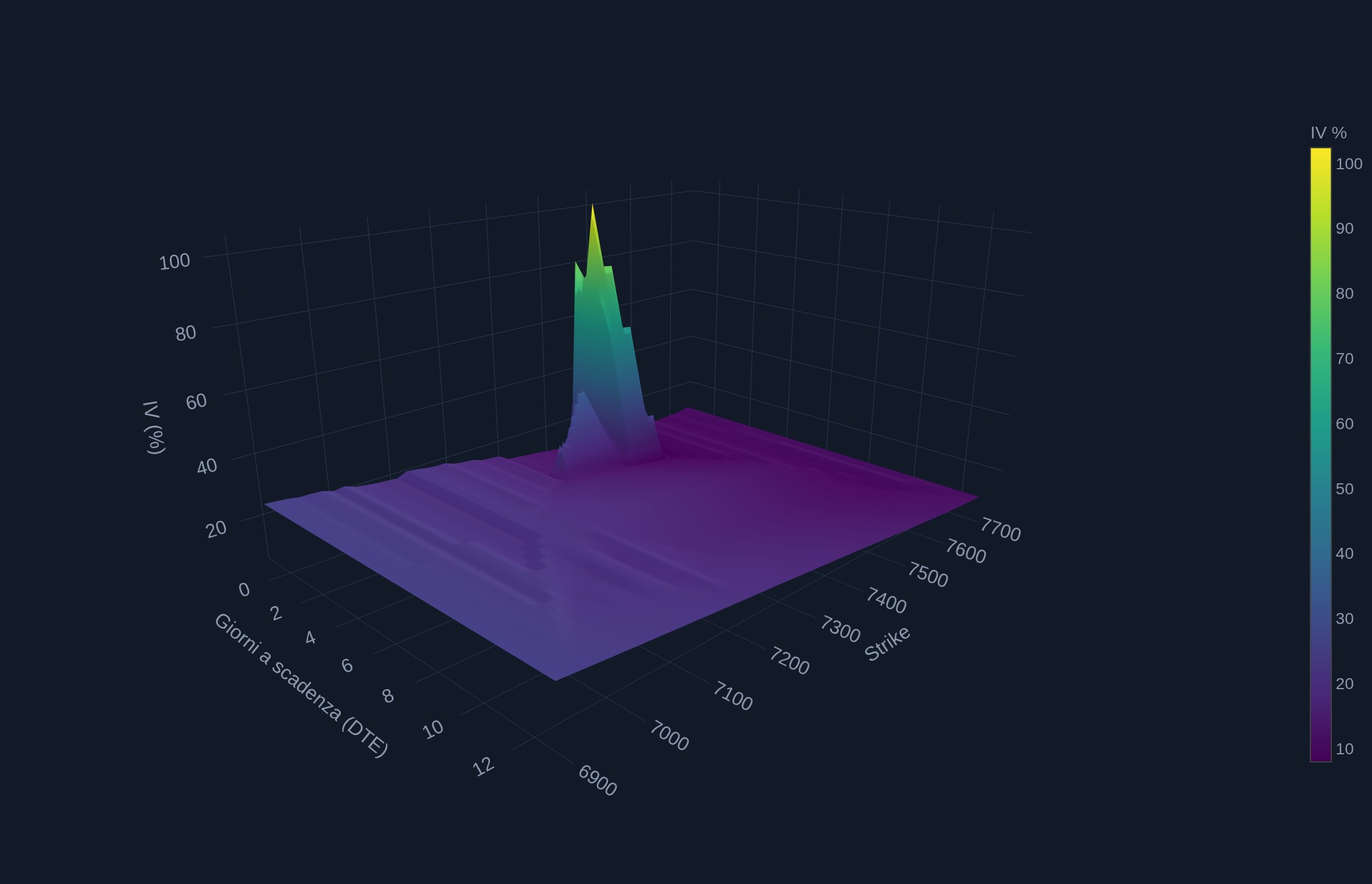
How to read it (in the tool the chart is interactive: rotate, zoom, hover over the points): the "wall" rising toward the lower strikes is the skew — out-of-the-money puts systematically cost more than calls, because downside insurance comes at a price. The profile along the time axis is the term structure. The isolated spike on the very shortest expirations near the spot reflects the nervous session in the example file.
An important control is the minimum delta slider at the top of the tab: it filters out options that are too far out of the money and illiquid, whose IV is mostly noise (the artificial 100–300% spikes that appear when you lower the filter). The default value works fine in most cases.
The bonus: an AI-ready JSON export
In the tool's sidebar there's a button I'm particularly fond of: "Scarica JSON Analisi (LLM Ready)" (Download Analysis JSON). It exports all the calculations for the selected expiration into a single structured file — not just the totals, but the full strike-by-strike profiles of GEX, DEX, VEX, open interest and activity. The file is designed to be fed to an AI like Claude or ChatGPT: the assistant can identify gamma clusters, concentration nodes and anomalous strikes on its own — rather than just commenting on the summary numbers. The methodological caveats travel inside the file too, so the automated analysis also inherits the model's conventions and limitations.
A starter prompt that works well:
A habit I recommend: archive one export a day. Over time, the history of your JSON files becomes a proprietary positioning dataset — something you'd normally pay for, built for free with five minutes a day.
Putting it all together: the level map and the daily routine
Let's recap the real case in a single table — it's the kind of "map" the tool hands you every day in five minutes:
| Level | Value | Source | Role |
|---|---|---|---|
| Call Wall | 7,600 | Max call OI within +10% | Potential resistance / upper edge of the range |
| Upper EM band | 7,593.51 | Expected Move | Upper bound priced by volatility (≈1σ) |
| Gamma Flip | 7,543.55 | Recomputed zero-gamma | Regime divide: above = cushioned market |
| Max Pain | 7,505 | Payout minimum | Theoretical expiration magnet |
| Vanna Flip | 7,495.20 | Recomputed zero-vanna | Shift in volatility sensitivity |
| Spot | 7,457.69 | CSV header | Below both flips: short gamma regime |
| Lower EM band | 7,321.87 | Expected Move | Lower bound priced by volatility (≈1σ) |
| Put Wall | 7,300 | Max put OI within −10% | Potential support / lower edge of the range |
Expiration context: Net GEX −$4.27B (short gamma) · Net DEX −$13.41B · Net VEX +$148.4M · P/C OI 3.91 · P/C Volume 2.49 · ATM IV 14.21% · VWAS 7,094.8 (bearish bias).
And this is the routine I recommend for using it, every day or before any trade on the index:
- Download the updated CSV from CBOE (Options Range: All) and upload it to the tool.
- Regime: check the sign of Net GEX and the spot's distance from the Gamma Flip. Short gamma → expect wide swings; long gamma → range-bound trading and mean reversion.
- Range: Put Wall and Call Wall plus the Expected Move bands. If they converge, as in our example, the range becomes more reliable.
- Magnets: Max Pain and gamma clusters from a pinning perspective, with increasing weight as expiration approaches.
- Daily flows: VWAS drift, volume P/C, strikes with Volume/OI above 1 — that's where tomorrow's positioning is being built.
- Volatility: at-the-money IV, skew and term structure on the 3D surface, to decide whether premium should be bought or sold.
- Export the JSON and archive it: you're building your own positioning history.
Limitations and caveats (the real ones)
A serious tool is also judged by how honest it is about its own limitations. These are the main ones, also stated inside the dashboard:
- Dealer exposures are assumptions, not observations. The convention used for GEX is the industry standard, but market makers' actual book isn't public. DEX and VEX, consistently, apply no convention at all: they're snapshots of open interest.
- It's a static snapshot. Open interest and Greeks refer to the moment of the export (data delayed by 15 minutes); official OI updates at the end of the day. On very short-dated expirations, intraday positioning can change quickly.
- One expiration at a time. The metrics apply to the selected expiration: for the full picture it's worth cycling through the main ones (the max-OI default helps). Only the volatility surface uses the entire chain.
- Levels aren't guaranteed walls. Walls, flips and Max Pain are statistical tendencies that price can cut through — and when it does so decisively, the effect often reverses and the move accelerates.
- Output quality depends on input quality. If the CSV is missing Greeks or IV on illiquid strikes, those contracts count as zero in the exposures (the tool flags this with a warning).
Options positioning doesn't tell you where the market will go: it tells you what field the game is being played on — where the walls are, where the regime changes, how much movement is already priced in. It's the context layer I use on top of my systematic strategies, and starting today it's available to anyone, for free. Open it, upload your first CSV and keep it open next to this guide: after two or three sessions, the level map becomes second nature.
This article is also available in Italian.